
Mastering ServiceNow: A Guide to Automating Tags with Scripts
Introduction
Welcome to the SNowIT.co blog! In this post, we are excited to delve into the world of ServiceNow and explore the powerful realm of scripted tags. If you’re looking to enhance your understanding of tags in ServiceNow and discover how automation through scripts can streamline your processes, you’re in the right place.
Tags Generally
Before we dive into the specifics of ServiceNow, let’s take a moment to understand the concept of tags in a broader context. Tags are a versatile organizational tool used in various platforms to categorize and label information. Whether you’re managing content, resources, or data, tags provide a flexible way to classify and sort items, making it easier to locate and manage them efficiently.
Tags in ServiceNow
Now, let’s narrow our focus to ServiceNow, a leading platform for digital workflows. In ServiceNow, tags play a pivotal role in organizing and categorizing records, such as incidents, changes, and assets. Understanding how to leverage tags effectively can significantly enhance the way you manage and retrieve information within the ServiceNow ecosystem.
Implementation in ServiceNow
In the accompanying video titled “#SNowIT ServiceNow: Scripted Tags,” we will guide you through the process of automating tags using scripts. Automation is a key aspect of ServiceNow, enabling you to streamline repetitive tasks and ensure consistency in your workflows.
In this tutorial, we will cover the step-by-step implementation of scripted tags in ServiceNow. Whether you’re a seasoned ServiceNow user or just getting started, this video will provide valuable insights into optimizing your tagging processes.
Feel free to follow along with the video, and by the end, you’ll have a solid understanding of how to harness the power of scripted tags to boost efficiency and organization within your ServiceNow instance.
Connect with Us
Join the SNowIT community and stay connected:
- Follow us on Facebook: fb.com/SNowIT.co
- Follow us on LinkedIN: linkedin.com/company/snow-it-co/
- Subscribe to our YouTube channel: youtube.com/@snowit_co
Unleashing ServiceNow Superpowers: A Guide to SNUtils Extension
Performance Analytics: Basic setup
Introduction
Welcome to SNowIT’s blog, where we explore the intricate world of ServiceNow. In this post, we’ll take you on a journey through the fundamental aspects of Performance Analytics. Whether you’re a ServiceNow veteran or just stepping into the realm of IT Service Management, understanding Performance Analytics is key to optimizing your processes.
Video Overview: ServiceNow Development Tips
In our featured video, “Performance Analytics Basic” we delve into the world of Performance Analytics, providing actionable insights on creating your first reports in ServiceNow. This must-watch tutorial is designed to empower both beginners and experienced users, offering practical tips to enhance your understanding and proficiency in leveraging Performance Analytics.
Understanding Performance Analytics
To kick off our exploration, let’s gain a comprehensive understanding of Performance Analytics and its pivotal role in transforming raw data into actionable insights. Discover how this robust toolset can empower your organization to make informed decisions, driving efficiency and productivity to new heights.
Key Components and Metrics
In the video, we navigate through the fundamental components of Performance Analytics—Indicators, Widgets, and Dashboards. Learn how to strategically choose and configure metrics that matter most to your organization, setting the stage for impactful reporting.
Creating and Customizing Reports
Building on the insights from the video, we provide a walkthrough on creating and customizing reports in ServiceNow. Uncover step-by-step instructions, practical tips, and real-world examples that will empower you to tailor reports to your specific needs and objectives.
Presenting in Dashboards
Once you’ve mastered report creation, the next step is presenting your data in a visually compelling way. Discover the art of dashboard creation in ServiceNow, where we share best practices for designing dashboards that effectively communicate insights and trends.
Tips and Best Practices
Our journey concludes with a collection of invaluable tips and best practices derived from real-world ServiceNow implementations. Gain insights into common pitfalls to avoid and strategies to optimize your Performance Analytics setup for sustained success.
Ready to enhance your ServiceNow development journey? Watch the video now and stay ahead in the world of technology!
Subscribe to our channel for regular updates and exclusive content. Let’s revolutionize your ServiceNow experience together!
Subscribe now: @snowit_co
Performance Analytics – Basic
Data Source with REST/ Data Stream (IntegrationHub) setup
Introduction
Are you ready to elevate your ServiceNow Development skills? Look no further! Within @snowit_co YouTube’s channel we want to bring you an exclusive video guide that delves deep into the intricacies of ServiceNow development, providing invaluable hints and insights.
Video Overview: ServiceNow Development Tips
In this must-watch video, we cover crucial aspects of ServiceNow development, focusing on creating a robust connection to the API. Whether you’re a seasoned developer or just starting, this guide will walk you through the essentials.
Key Highlights
- API Connection Mastery: Understand both basic and OAuth authentication methods to establish a secure and efficient connection to ServiceNow’s API.
- Incremental Data Load: Learn to create a seamless process for collecting recently updated records at regular intervals (e.g., every 10 minutes).
- Bulk Data Upload: Dive into the world of bulk data uploads, perfect for managing larger datasets with a weekly upload schedule.
- Data Processing & Workflow Management: Gain insights into processing data effectively and managing the entire workflow effortlessly.
Ready to enhance your ServiceNow development journey? Watch the video now and stay ahead in the world of technology!
Subscribe to our channel for regular updates and exclusive content. Let’s revolutionize your ServiceNow experience together!
Subscribe now: @snowit_co
Data Source with REST / Data Stream (IntegrationHub)
Implementing Pagination in ServiceNow Data Source
Introduction
Handling vast datasets from APIs often presents challenges due to the sheer volume of information returned. Pagination is a critical technique in managing and retrieving data efficiently in such scenarios. This article delves into the significance of pagination within ServiceNow when dealing with extensive data from REST APIs.
Understanding Pagination
Pagination involves dividing large datasets into smaller, manageable parts or pages. Within REST APIs, this technique restricts the data returned per request by specifying a page size and offset. This method significantly eases data retrieval, enhances performance, and reduces the burden on both the API server and the client application.
Setting Up the Data Source
As an illustrative example, this article uses the PokeAPI, a well-known source for Pokémon-related data. To initiate the data source setup in ServiceNow, a few prerequisites are necessary:
- Accessing the ServiceNow Instance: Logging into the ServiceNow instance.
- Navigating to Data Sources: Locating and accessing the ‘Data Sources’ section within ServiceNow.
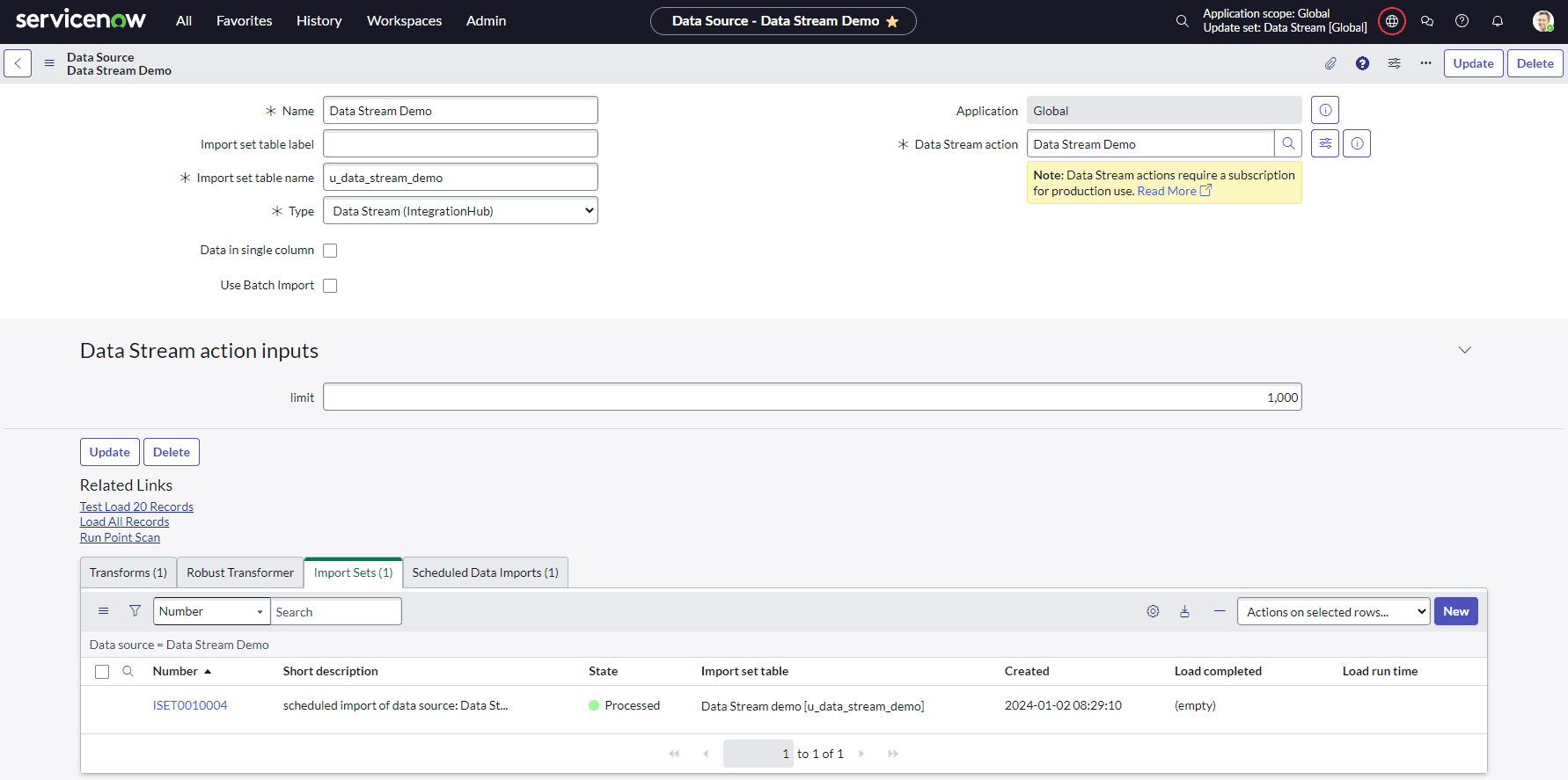
- Adding a New Data Source: Creating a dedicated data source tailored for the PokeAPI using the Data Stream (IntegrationHub) type. This setup includes assigning a source table and connection alias. The subsequent section details the process of creating a Data Stream.
Implementing Pagination
Managing pagination within the PokeAPI involves regulating the page size and offset values during API requests:
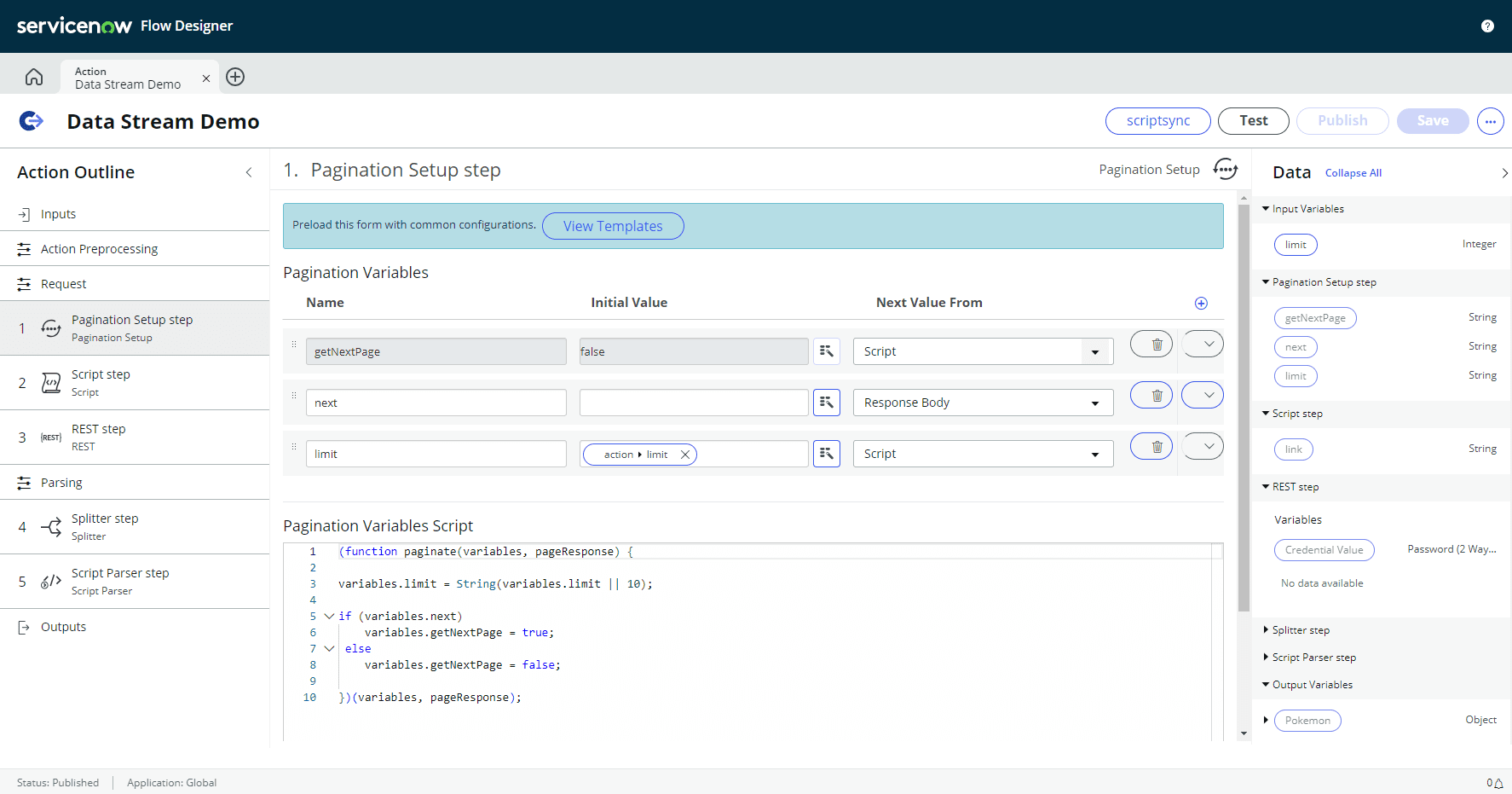
- Defining Page Size and Offset: Determining the ideal page size for efficient data retrieval and managing subsequent pages through offset adjustments.
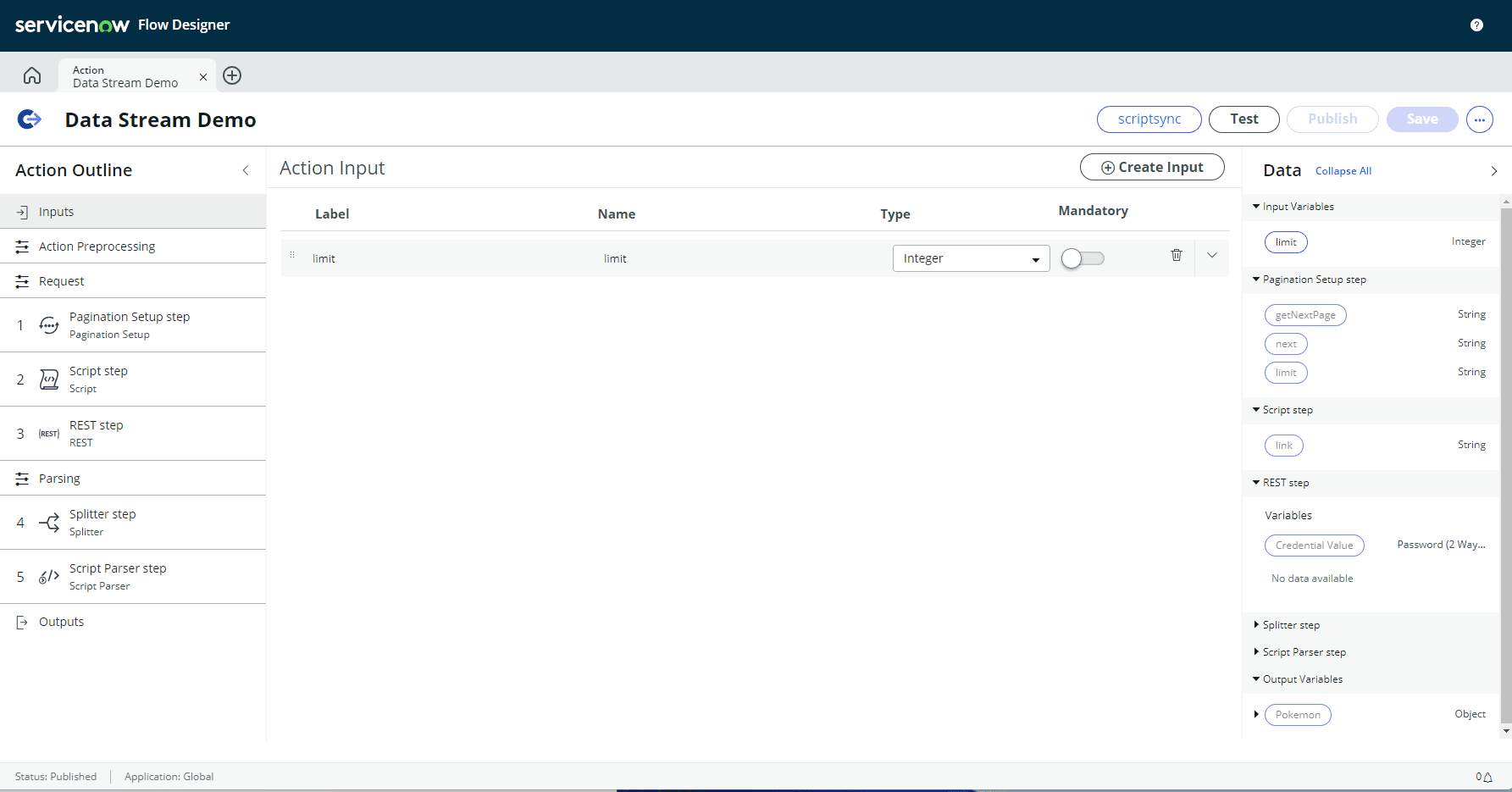
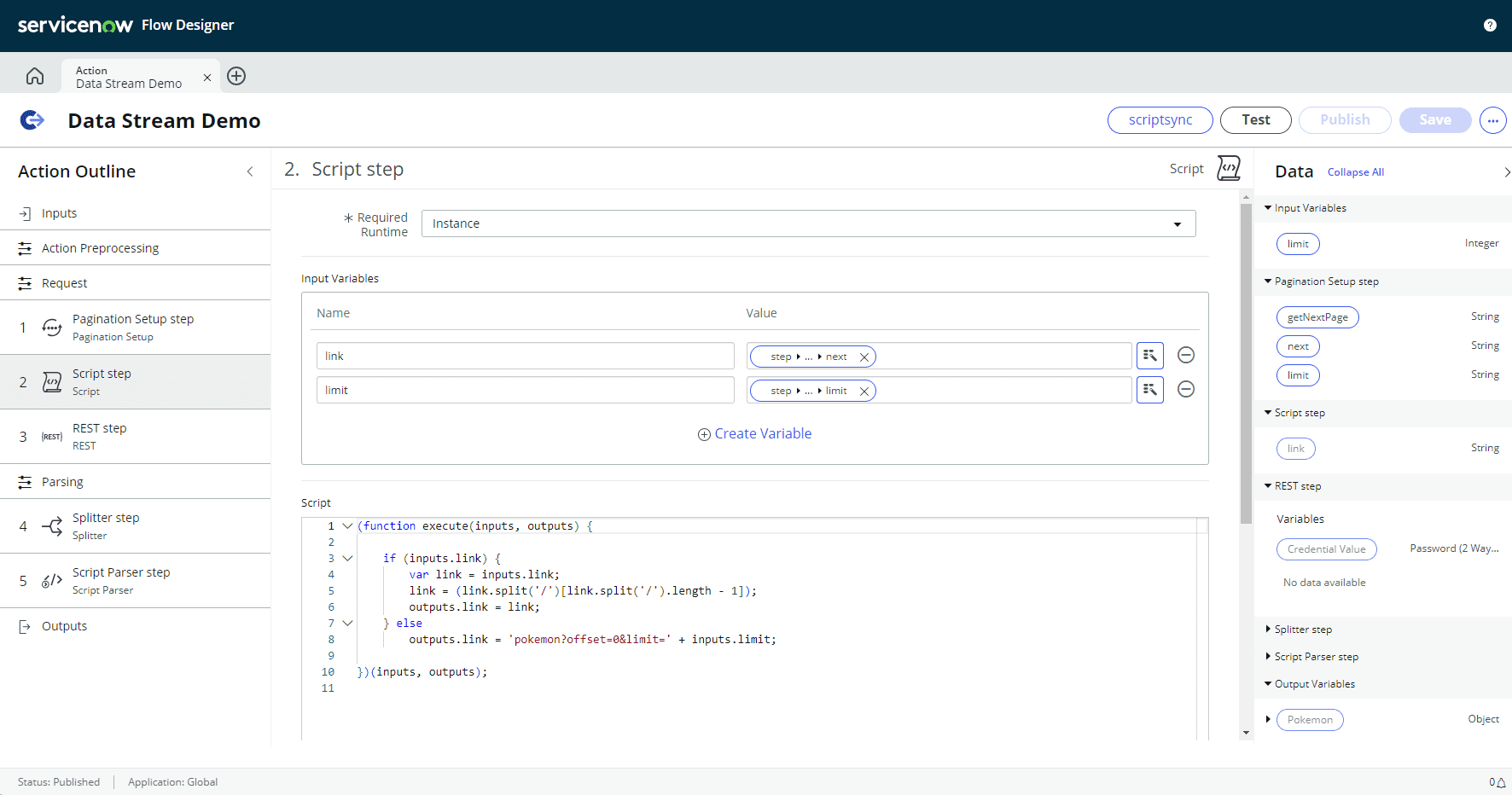
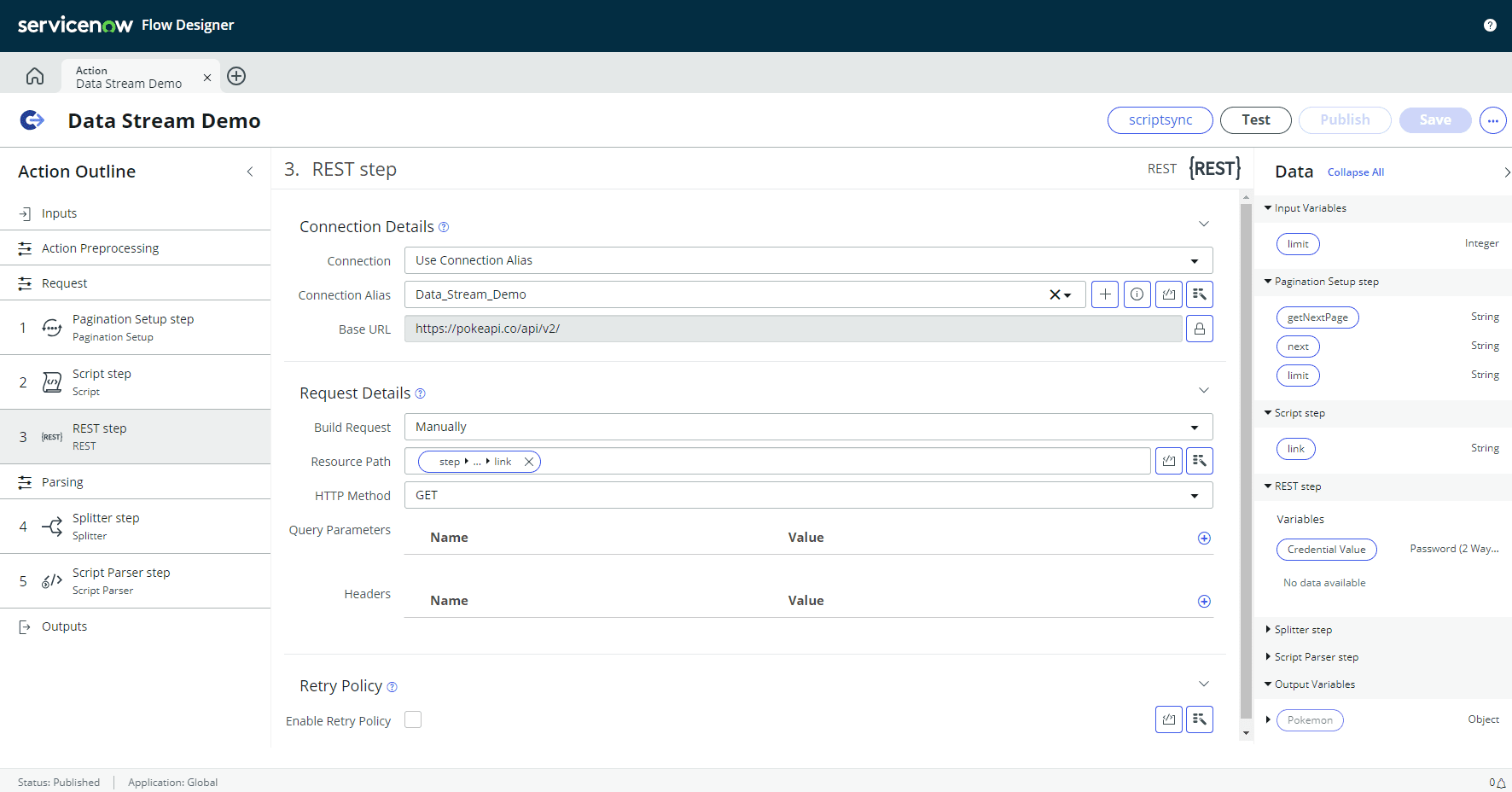
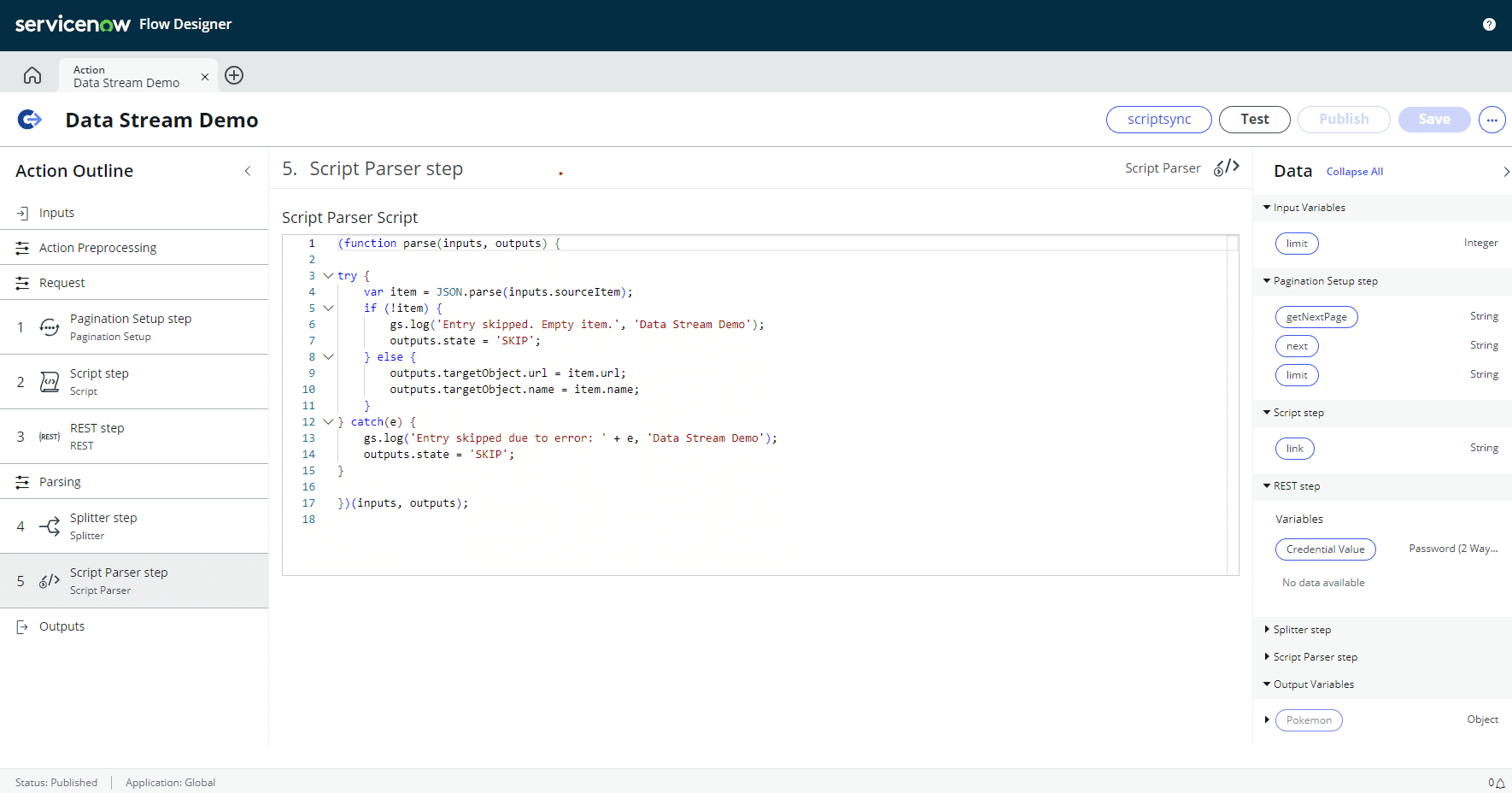
- Constructing the REST API Call: Creating the necessary REST API call within ServiceNow, configuring parameters such as limit and offset for effective pagination.
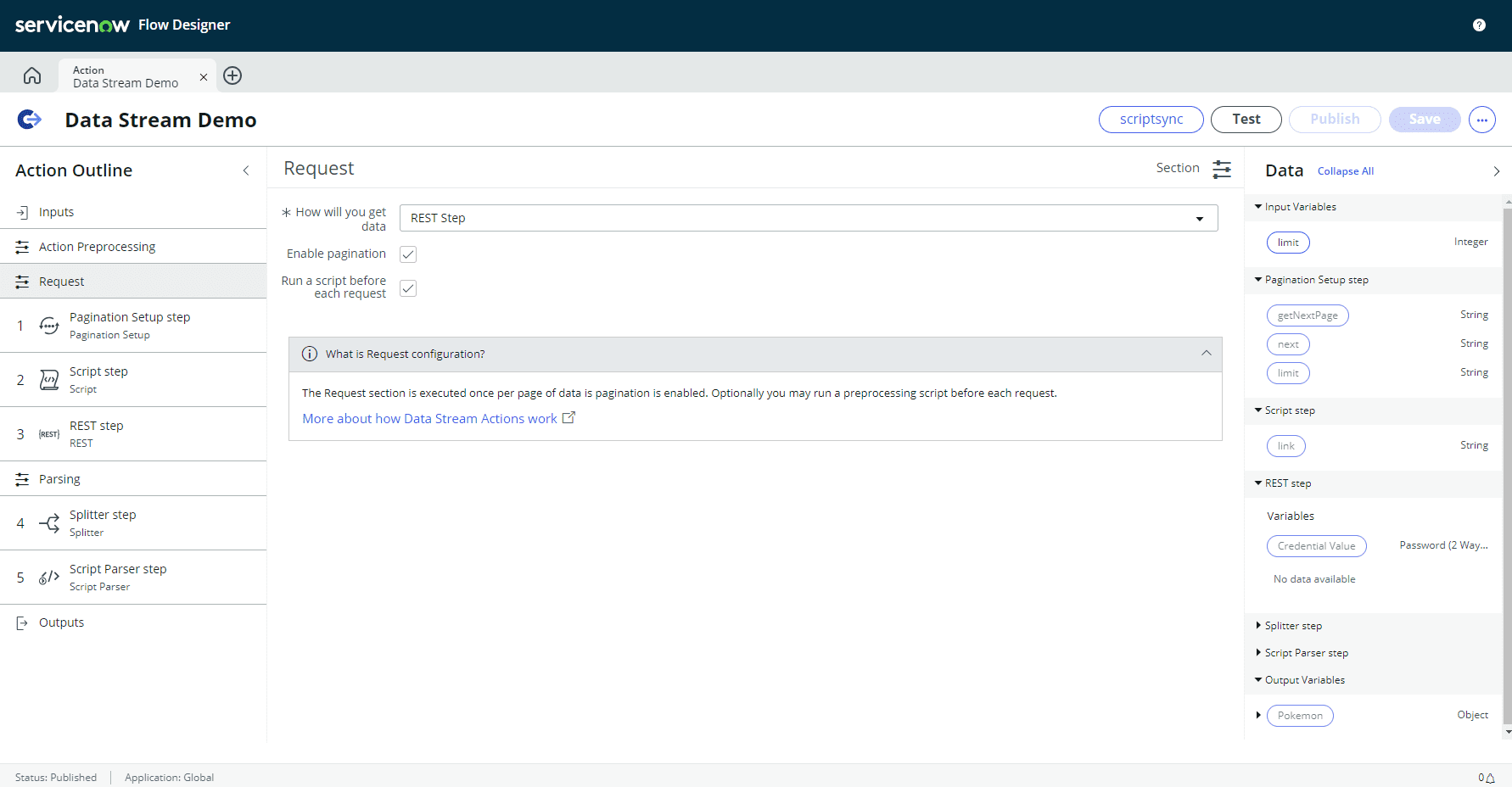
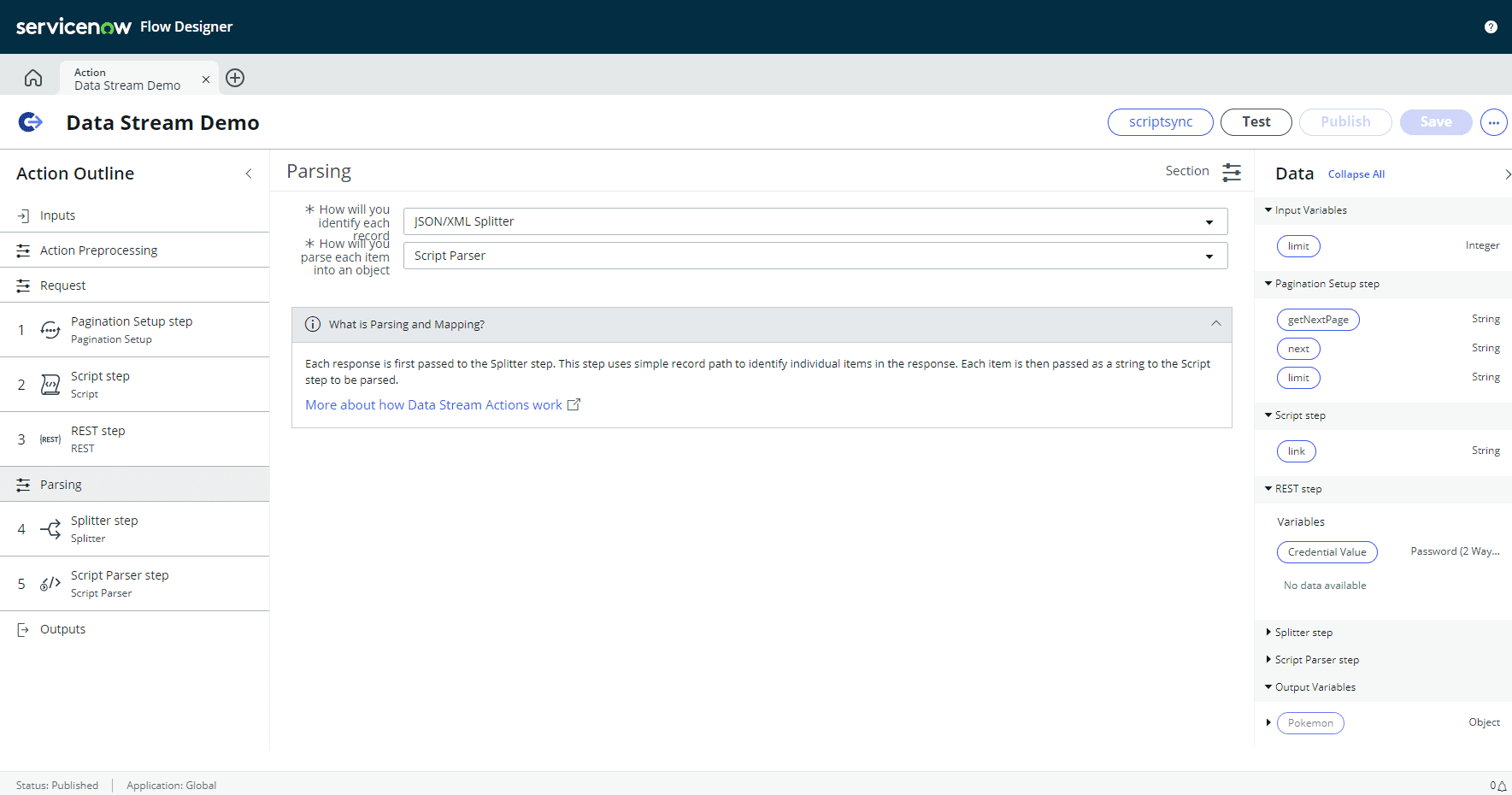
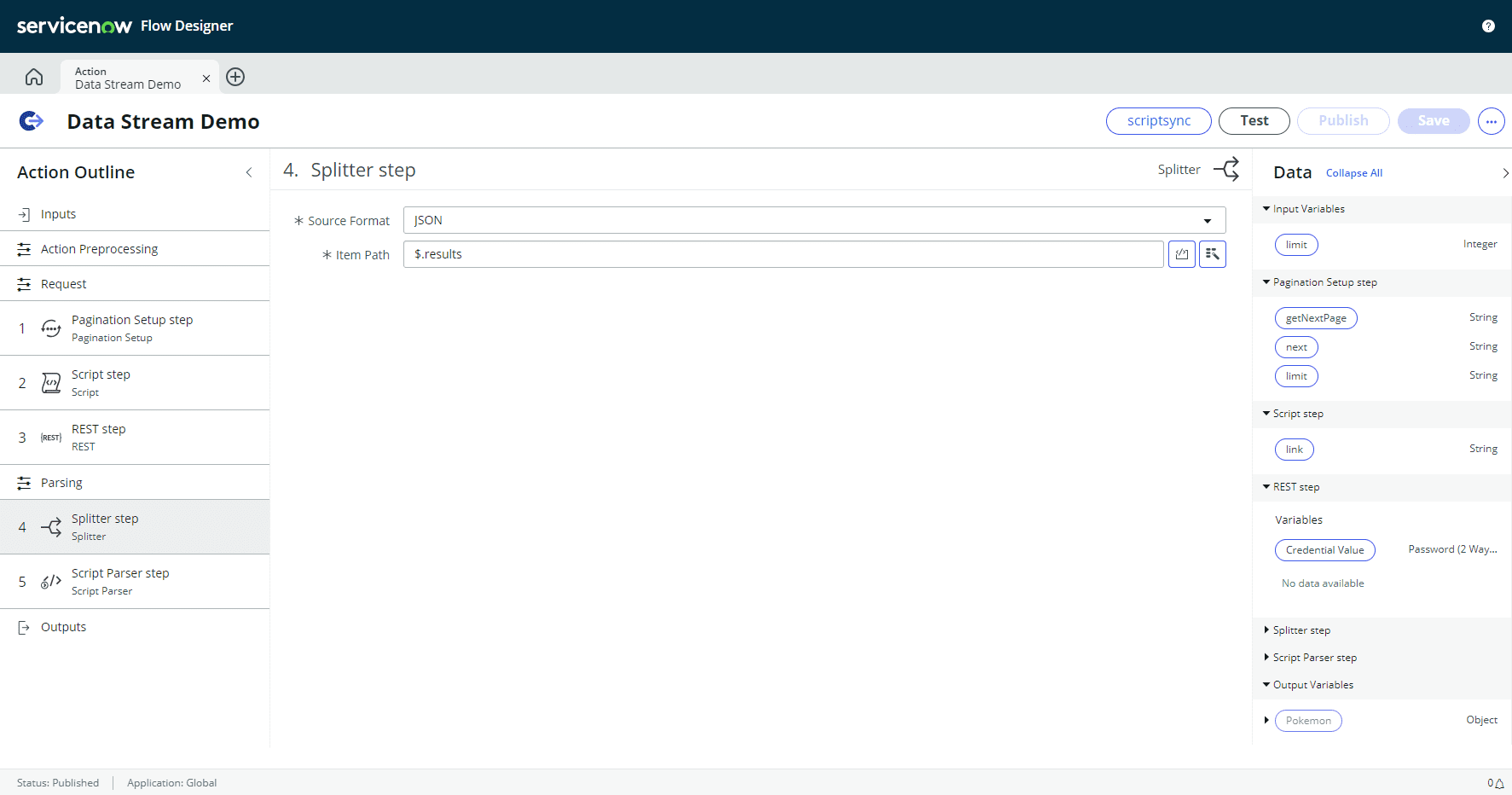
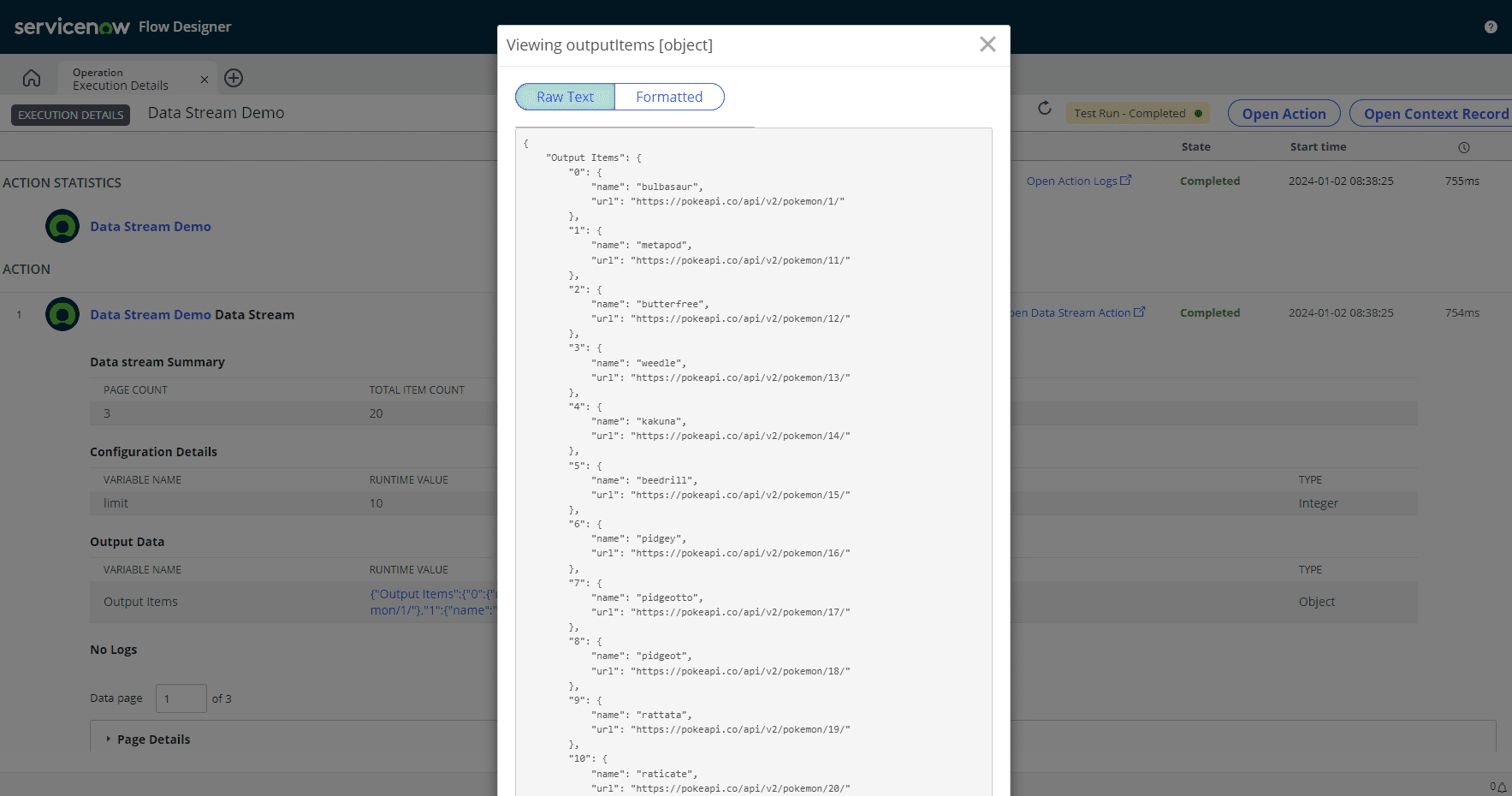
- Handling Multi-page Responses: Implementing logic to retrieve subsequent pages of data and merging or processing them as required.
Demonstration with ServiceNow
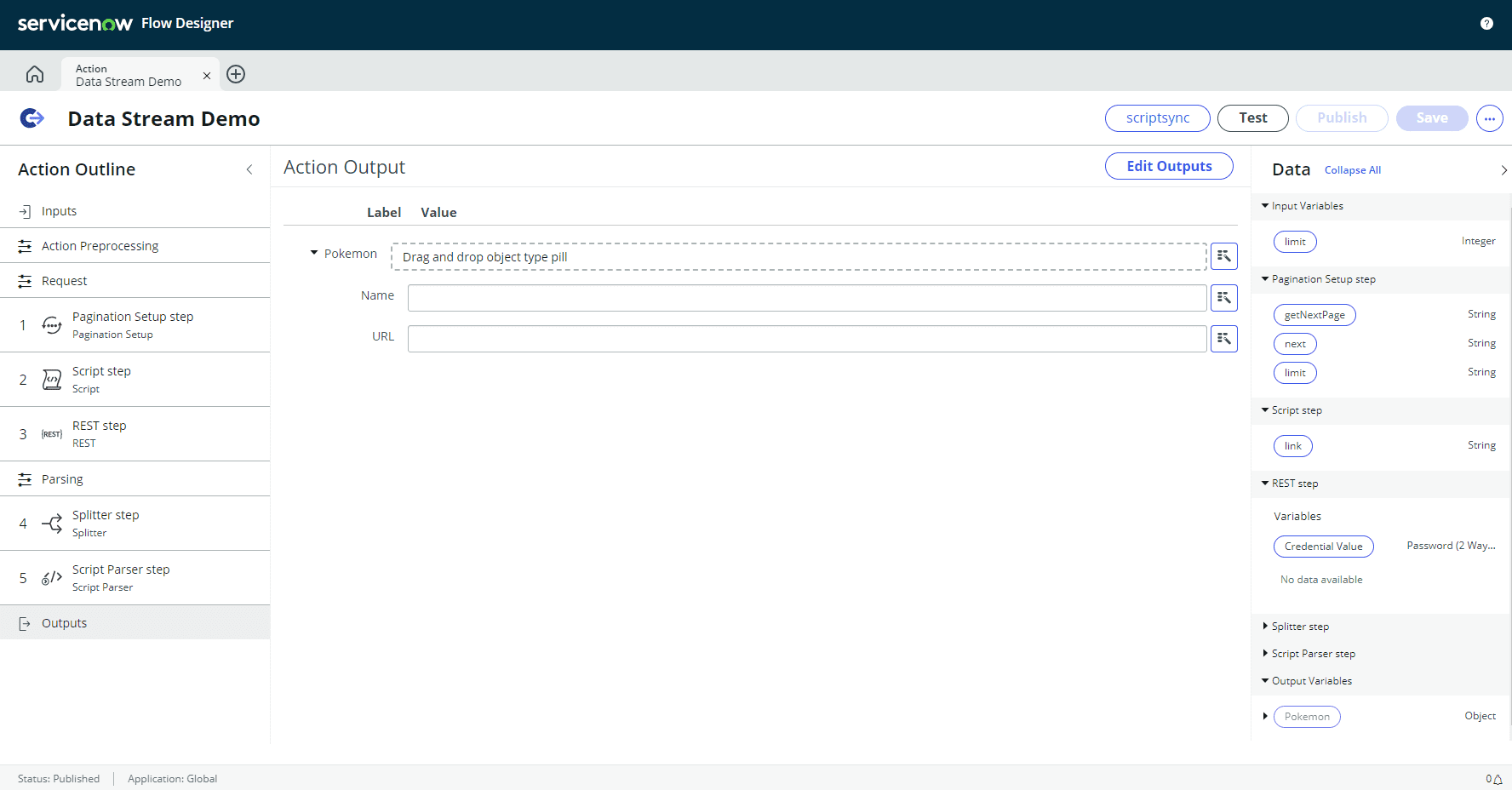
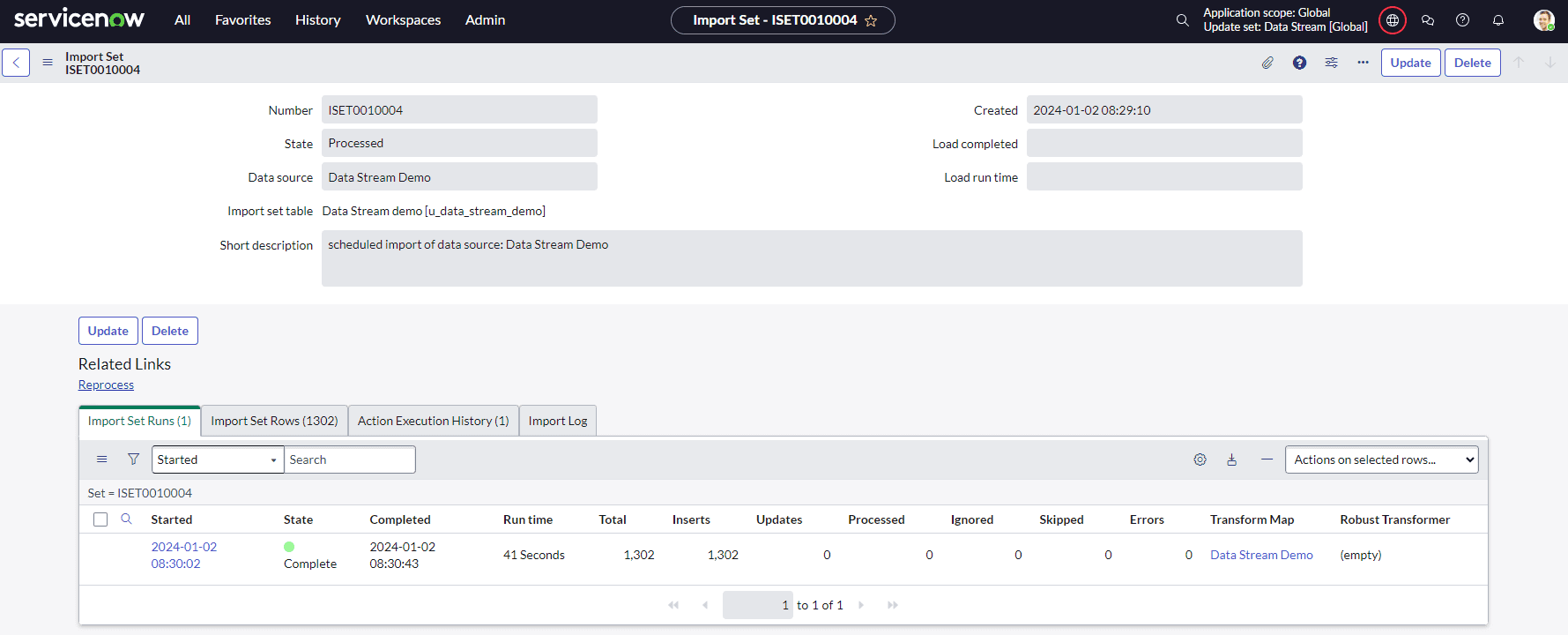
The article proceeds to outline the practical steps of implementing pagination using the PokeAPI within the ServiceNow platform:
|
 |
|
 |
|
 |
|
 |
|
 |
|
 |
|
 |
|
 |
|
 |
|
 |
|
 |
|
 |
Conclusion
Pagination techniques, as exemplified using the PokeAPI within ServiceNow, are indispensable for efficiently managing extensive datasets. Embracing pagination methodologies empowers developers to optimize data retrieval, bolster application performance, and adeptly handle voluminous datasets within ServiceNow applications. Readers are encouraged to explore and implement these techniques independently.
Unveiling ServiceNow List Filtering: Leveraging ‘NOT IN’ for Enhanced Queries
Introduction
In the realm of ServiceNow, navigating and filtering through data stands as a fundamental pillar for efficient operations and informed decision-making. While the platform offers robust filtering capabilities, there’s a notable absence: the ‘is not one of’ qualifier. This limitation often poses a challenge when trying to exclude specific items from a filtered list. However, there’s a workaround—a simple URL manipulation—that allows users to achieve the same effect, unlocking enhanced filtering possibilities.
Understanding List Filtering
ServiceNow’s list filtering feature is pivotal for organizing and analyzing data within the platform. It provides a streamlined way to refine data views, enabling users to focus on specific information relevant to their tasks or analysis.
However, one notable gap in this functionality is the absence of the ‘is not one of’ qualifier. This omission restricts the ability to exclude specific items from a filtered list easily. For instance, when working with lists of records, such as incidents or tasks, the inability to filter out certain entries based on particular criteria might hinder precise data representation.
Unveiling the ‘NOT IN’ Hack
Let’s consider an example scenario where we’re filtering a list using the ‘is one of’ qualifier. Here’s an initial representation of the list:
Image 1: Unfiltered list
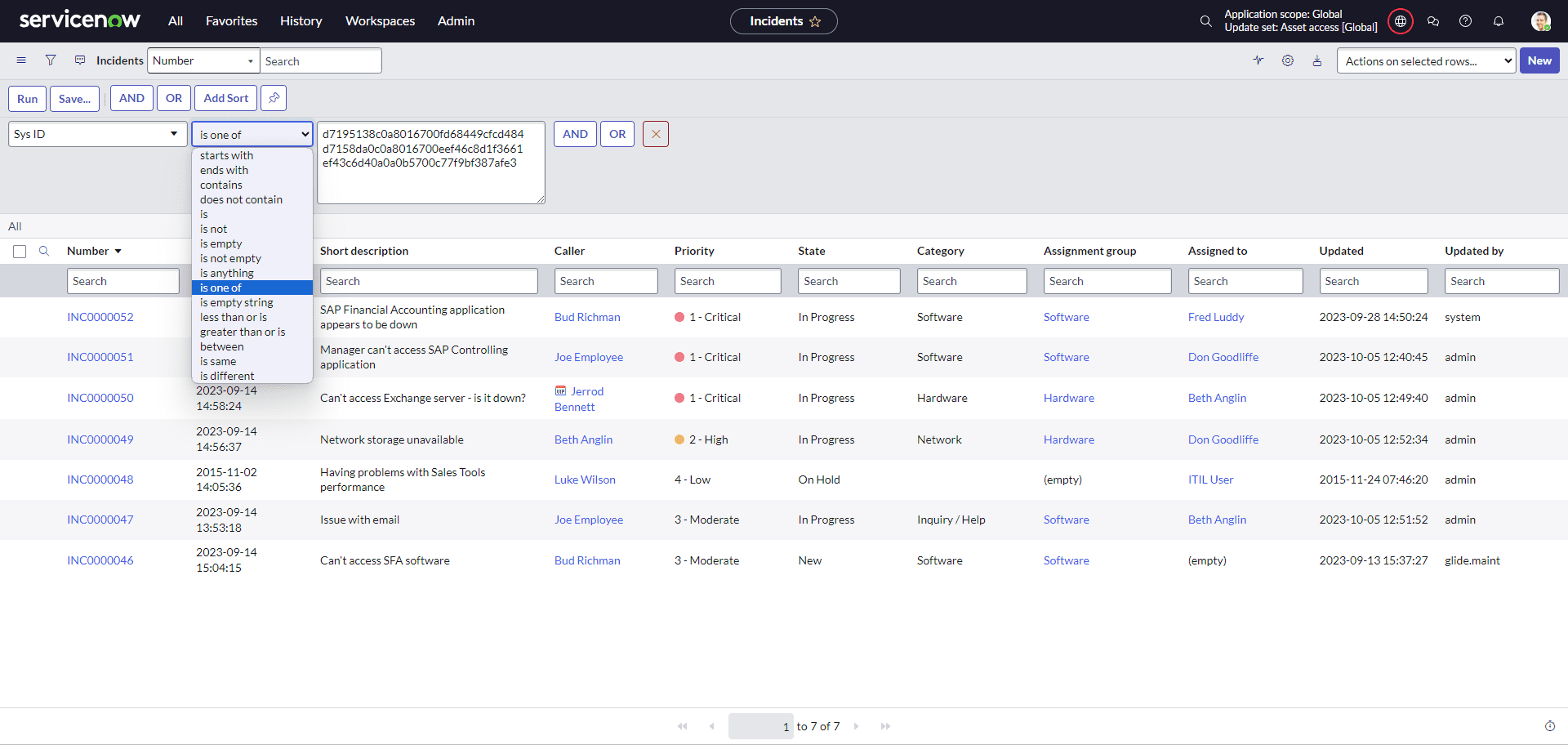
Now, utilizing the ‘is one of’ qualifier, we filter the list based on a set of criteria:
Image 2: Filtered list using ‘is one of’
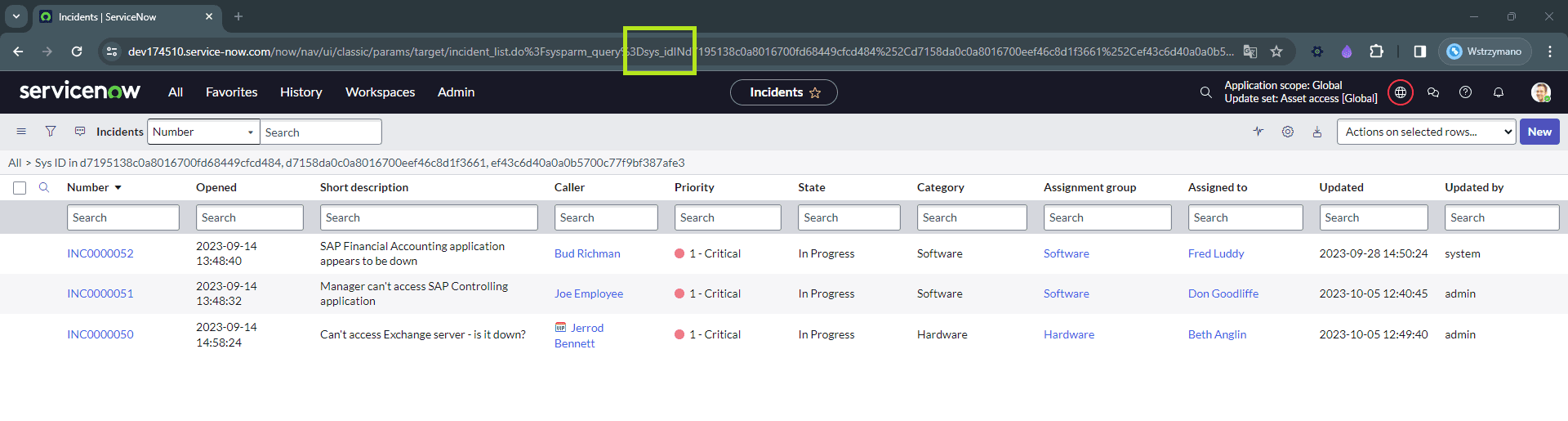
Introducing ‘NOT IN’
But what if we want to exclude specific items that fall under certain criteria? Enter the ‘NOT IN’ concept, a clever workaround achieved through a simple URL modification.
By altering the URL query, changing ‘sys_idIN’ to ‘sys_idNOT IN’, we can effectively achieve the ‘is not one of’ functionality:
Image 3: Filtered list using ‘NOT IN’
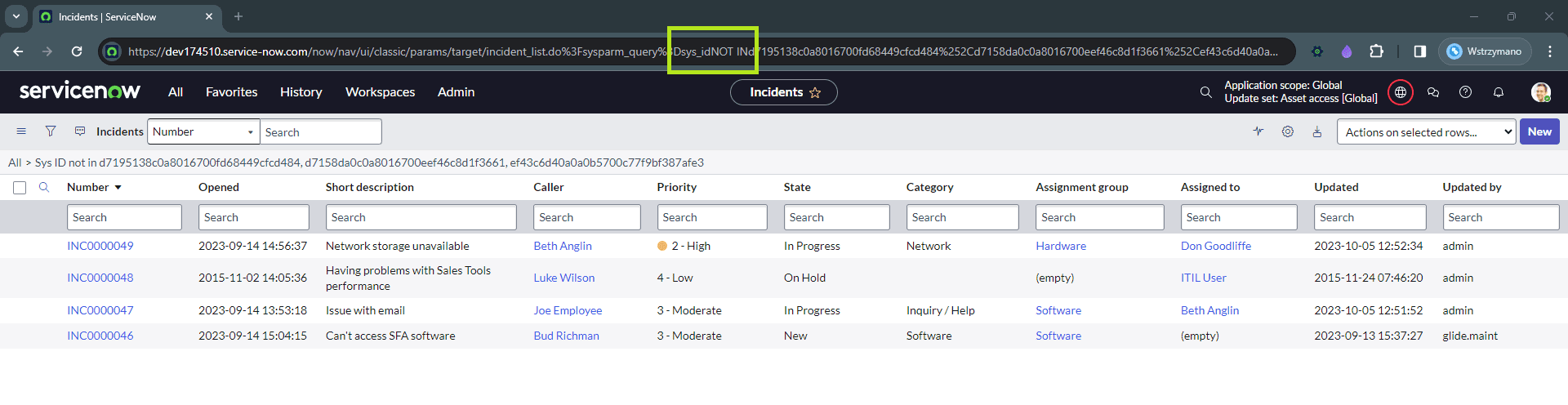
Benefits and Applications
This simple URL manipulation trick unlocks a plethora of benefits:
- Enhanced Query Capabilities: It expands the filtering capabilities within ServiceNow, allowing users to refine data views with greater precision.
- Practical Use Cases: Consider scenarios where this workaround proves invaluable:
- Excluding Specific Records: Filtering out records that don’t meet certain criteria, enhancing the accuracy of data views.
- Refining Dashboards: Building customized dashboards that precisely display relevant information by excluding unwanted data points.
Conclusion
In the world of ServiceNow data filtering, the absence of an ‘is not one of’ qualifier may seem limiting at first glance. However, by harnessing the power of a simple URL tweak, users can efficiently achieve the same effect, excluding specific items and expanding their filtering capabilities. This savvy workaround empowers ServiceNow users to wield more precise data representations, enabling streamlined workflows and informed decision-making.