
ServiceNow Washington release: Catalog UI Policy Actions
Introduction
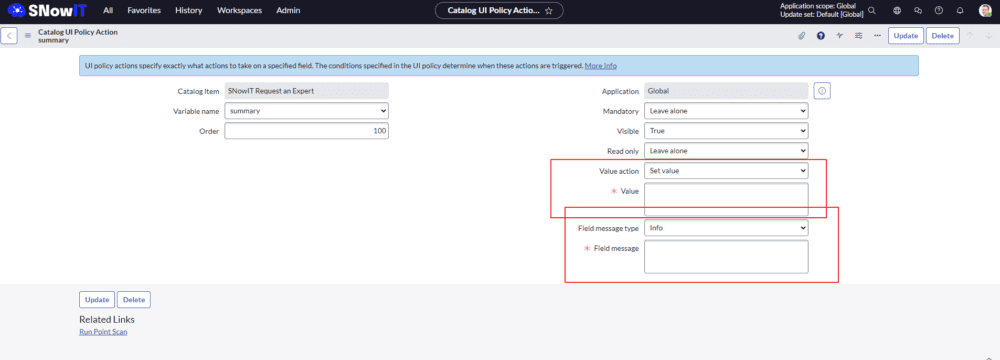
Are you tired of spending hours scripting to set values and display field messages in ServiceNow? Say hello to a game-changing solution unveiled by ServiceNow in their latest release!
We’re thrilled to introduce you to ServiceNow’s revolutionary approach to Catalog UI Policies. Gone are the days of wrestling with complex scripts. Now, you can handle everything directly from the UI Policy action, making tasks simpler and more efficient than ever before.
Solution
Here’s what you can expect from this groundbreaking update:
- Simplified Workflow: No more scripting required! With ServiceNow’s new solution, you can easily set values and display field messages directly from the UI Policy action.
- Increased Productivity: By eliminating the need for manual scripting, you’ll free up valuable time to focus on more strategic initiatives and drive greater productivity across your organization.
- Enhanced User Experience: With smoother workflows and fewer barriers, your users will experience a seamless and intuitive interaction with your ServiceNow platform.
ServiceNow Washington Release: Time-limited Roles
Introduction
ServiceNow, the leading platform for digital workflow management, is gearing up to release its highly anticipated Washington Release, packed with innovative features aimed at streamlining processes and enhancing user experience. Among the myriad of enhancements, one standout feature is poised to revolutionize access management: Time-Limited Roles.
Unlocking the Potential of Time-Limited Roles
Traditionally, managing user roles within an organization has been a cumbersome process, often requiring manual intervention to grant or revoke permissions. However, with Time-Limited Roles, ServiceNow introduces a dynamic solution that empowers administrators to grant specific roles to users for a predefined duration, eliminating the need for constant oversight and manual adjustments.
How Time-Limited Roles Work
Imagine a scenario where an employee requires temporary access to a critical system or database for a specific project or task. With Time-Limited Roles, administrators can effortlessly assign the necessary role to the user, specifying the precise start and end dates for the access period. Once the designated timeframe elapses, the role is automatically revoked, reducing the risk of unauthorized access and ensuring compliance with security protocols.
Key Benefits of Time-Limited Roles
- Enhanced Security: By limiting the duration of user roles, organizations can mitigate the risk of unauthorized access and potential security breaches.
- Streamlined Access Management: Time-Limited Roles automate the process of granting and revoking permissions, reducing administrative overhead and improving efficiency.
- Improved Compliance: Organizations can maintain compliance with regulatory requirements by ensuring that access permissions are granted only when necessary and for the required duration.
- Flexibility and Agility: With the ability to set custom start and end dates for role assignments, administrators have greater flexibility in accommodating evolving business needs and project timelines.
Setting Up time
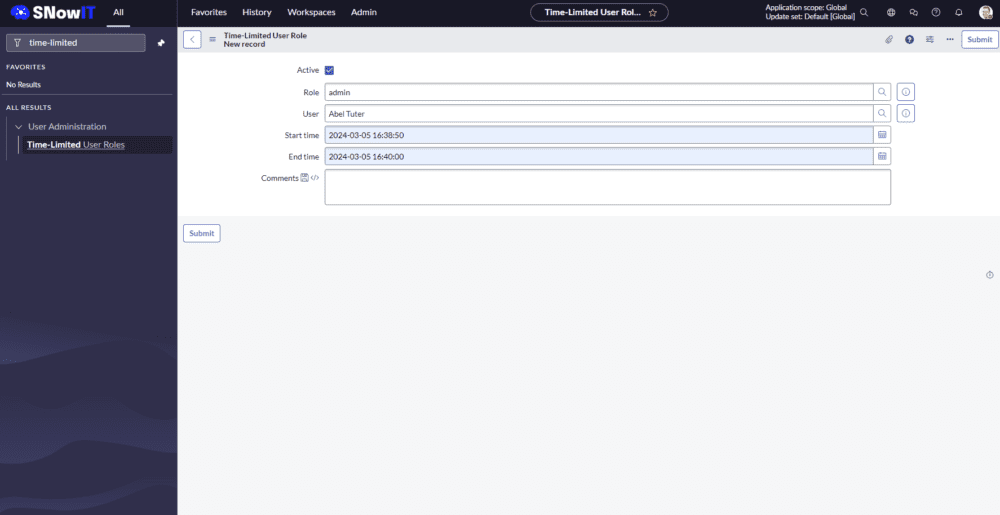
Setting up Time-Limited Roles couldn’t be easier. Simply navigate to the ‘Time-Limited User Roles’ module within the ServiceNow platform and create a new entry. That’s it! With just a few clicks, administrators can define the role, specify the start and end dates, and effortlessly manage access permissions for users across the organization. Streamline your access management process and unlock the full potential of Time-Limited Roles with this straightforward setup procedure.
Get Ready for the Future of Access Management
As organizations continue to navigate the evolving landscape of digital transformation, the need for agile and secure access management solutions becomes increasingly apparent. With Time-Limited Roles, ServiceNow empowers businesses to stay ahead of the curve by providing a robust framework for managing user access with unparalleled flexibility and efficiency.
In conclusion, the introduction of Time-Limited Roles in ServiceNow’s Washington Release represents a significant milestone in the realm of access management, offering a glimpse into the future of streamlined workflows and enhanced security. Stay tuned as we delve deeper into the exciting features and capabilities of ServiceNow’s latest release, setting the stage for a new era of digital innovation and productivity.
Unlock the Power of ServiceNow Catalog Items: A Comprehensive Guide
Introduction
Welcome to the “#SNowIT ServiceNow: Catalog Items” series, your comprehensive guide to mastering the intricacies of Catalog Items, Record Producers, Content Items, and Order Guides in ServiceNow. Whether you’re a seasoned ServiceNow user or just getting started, this series will equip you with the knowledge and skills needed to optimize your ServiceNow instance and streamline your organization’s service delivery processes.
Scope
In this series, we’ll dive deep into each aspect of ServiceNow Catalog Items, covering everything from the basics to advanced configurations and best practices. Our expert tutorials will walk you through setting up Catalog Items and Record Producers, configuring variables, implementing logic, retrieving variables via scripts, and leveraging Content Items and Order Guides to enhance your service catalog offerings.
Each episode will feature in-depth explanations, practical demonstrations, and real-world examples to ensure you not only understand the concepts but also know how to apply them effectively in your own ServiceNow instance.
Whether you’re looking to improve efficiency, enhance user experience, or simply expand your ServiceNow skills, this series has something for you. Join us on this journey to master ServiceNow Catalog Items and unlock the full potential of your ServiceNow platform. Subscribe now and let’s start optimizing your service delivery workflows together!
ServiceNow Washington Release: A Deep Dive into Form Builder
Introduction
Welcome to the latest update from SNowIT! Today, we’re thrilled to unveil the cutting-edge features of Form Builder within the upcoming Washington release of ServiceNow. If you’re eager to stay ahead of the curve and optimize your ServiceNow experience, this blog post is for you.
What’s New in UI Builder?
UI Builder is the powerhouse behind ServiceNow’s user interface customization capabilities, and with the Washington release, it’s packed with even more functionalities to empower developers, administrators, and end-users alike. Let’s take a closer look at some of the highlights:
1. Adding Fields and Sections: Gone are the days of rigid form layouts. With UI Builder, you have the flexibility to customize form views by seamlessly adding fields and sections tailored to your organization’s unique requirements.
2. Dot-Walked Fields: Say hello to enhanced data visibility! UI Builder now allows you to incorporate dot-walked fields effortlessly, giving you access to related data fields within your form views with ease.
3. Handling Views: Managing form views has never been simpler. From default configurations to custom layouts, UI Builder empowers you to create intuitive user experiences that elevate productivity and user satisfaction.
4. Checking Overview: Gain valuable insights into your ServiceNow environment with a centralized overview of essential components assigned to your tables. From UI Policies and Client Scripts to Business Rules, ACLs, and Workspace View Rules, stay informed and in control from one convenient location.
Dive Deeper with SNowIT
Ready to unlock the full potential of UI Builder in the Washington release? Join us on a journey of exploration and discovery as we delve into the intricacies of ServiceNow’s most powerful customization tool yet.
Stay Tuned!
Be sure to subscribe to SNowIT for more in-depth tutorials, tips, and updates on all things ServiceNow. The Washington release is just the beginning, and we’re committed to helping you make the most of every new feature and enhancement.
Are you ready to revolutionize your ServiceNow experience? Let’s embark on this journey together. Stay connected with SNowIT, and let’s transform the way you work with ServiceNow!
Mastering IntegrationHub ETL Setup in ServiceNow
Introduction
Welcome to the SNowIT blog, where we delve into the intricacies of ServiceNow to empower your IT operations. In today’s post, we’re thrilled to guide you through the setup process for IntegrationHub ETL in ServiceNow, a crucial component for seamless data integration within the platform.
Understanding IntegrationHub ETL
IntegrationHub ETL (Extract, Transform, Load) is the backbone of data integration in ServiceNow, enabling organizations to efficiently upload external data into the system. At its core lies the powerful IRE engine (Identification and Reconciliation rules in CMDB), which ensures data accuracy and integrity throughout the integration process.
Key Components of Setup
- Data Source Structuring: Before diving into integration, it’s essential to structure your data source effectively. Proper organization lays the foundation for smooth data ingestion into ServiceNow, enhancing overall efficiency.
- Data Preparation Techniques: Collecting and manipulating data to meet ServiceNow’s requirements is a critical step in the integration process. From data cleansing to format standardization, meticulous preparation is key to successful integration.
- Mapping Essentials: Mapping classes, attributes, and relationships within ServiceNow is vital for accurate data representation. A thorough understanding of mapping techniques ensures seamless data flow and alignment with organizational needs.
- Results Visualization: Witnessing the outcomes of your integration efforts within ServiceNow is both rewarding and informative. Visualizing successful data integration provides valuable insights into system performance and data accuracy.
- Error Handling Strategies: Despite careful planning, errors may occur during integration. Effective error handling strategies are essential for identifying, troubleshooting, and resolving issues promptly, minimizing disruptions to data flow.
Empower Your Integration Journey
Whether you’re a seasoned ServiceNow administrator or new to data integration, mastering IntegrationHub ETL setup is paramount for optimizing your ServiceNow experience. By following best practices and leveraging the capabilities of IntegrationHub, you can streamline data integration processes and unlock the full potential of your ServiceNow platform.
Join us on SNowIT as we continue to explore the nuances of ServiceNow and IT operations management. Stay tuned for more insightful content to enhance your ServiceNow proficiency and drive organizational success.
Unlocking ServiceNow’s Potential: Scripted REST API with OAuth
Introduction
In today’s digital landscape, securing your REST APIs is paramount to safeguarding sensitive data and ensuring seamless communication between applications. ServiceNow, a leading platform for digital workflows, offers robust capabilities for managing REST APIs, including the ability to implement OAuth authentication. In this tutorial, we’ll explore the ins and outs of setting up OAuth authentication for Scripted REST APIs in ServiceNow, empowering you to enhance security and streamline development workflows.
Understanding OAuth Authentication
Before diving into the implementation, it’s essential to grasp the fundamentals of OAuth authentication. OAuth provides a secure and standardized framework for authorizing third-party access to resources without sharing credentials. By leveraging OAuth in ServiceNow, you can enforce access controls and protect sensitive data while enabling seamless integration with external systems.
Setting Up OAuth for Scripted REST APIs
Configuring OAuth for Scripted REST APIs in ServiceNow involves several key steps:
- Setup Application Registry:
- Navigate to “System OAuth” > “Application Registry”.
- Create a new OAuth client application (Create an OAuth API endpoint for external clients) to obtain the Client ID and Client Secret.
- Setup a User for Triggering Requests:
- Create a dedicated user account that will be used to trigger requests to the Scripted REST API.
- Ensure that the user has appropriate roles and permissions to access the necessary resources and trigger the API requests.
- Setup Scripted REST API:
- Navigate to “System Web Services” > “Scripted REST APIs”.
- Create a new Scripted REST API to define the endpoint, headers, parameters.
- Setup Scripted REST Resource:
- Within the Scripted REST API definition, create a new Scripted REST Resource to specify the final endpoint and define the script where the OAuth handler will be implemented.
- Define the final endpoint URL and any additional parameters or headers required for the API request.
- Implement the OAuth handler logic within the script to authenticate incoming requests using OAuth tokens obtained from the client application.
- Test Integration:
- Once the Scripted REST API and resource are set up, test the integration to ensure that OAuth authentication is functioning correctly.
- Use the dedicated user account created earlier to trigger requests to the API endpoint.
- Verify that the requests are successfully authenticated using OAuth tokens and that the expected responses are returned.
By following these steps, you can effectively set up OAuth authentication for Scripted REST APIs in ServiceNow and test the integration to ensure seamless communication and security. Adjust the configurations and scripts as needed based on your specific requirements and use cases.
Best Practices and Considerations
As you navigate the process of implementing OAuth authentication for Scripted REST APIs in ServiceNow, consider the following best practices:
- Keep Credentials Secure: Safeguard OAuth credentials and tokens to prevent unauthorized access to your ServiceNow instance and sensitive data.
- Regularly Monitor and Audit Access: Monitor OAuth token usage and conduct periodic audits to ensure compliance with security policies and detect any unauthorized access attempts.
- Stay Updated: Stay abreast of updates and security patches released by ServiceNow to address any vulnerabilities or emerging threats related to OAuth authentication.
Conclusion
By implementing OAuth authentication for Scripted REST APIs in ServiceNow, you can enhance the security and integrity of your digital workflows while facilitating seamless integration. Armed with the knowledge and best practices outlined in this tutorial, you’re well-equipped to harness the full potential of ServiceNow’s capabilities and drive innovation within your organization.